Back to blog
How to build a Data Feed Platform

Leveraging x402 and Pinata
Pinata recently released our x402 implementation that lets our users monetize content via their dedicated gateways. This functionality opens up a whole new world of possibilities for Pinata users, and a big use case we're excited about is data feeds. Specifically data feeds that leverage x402 to manage buying and selling of data feed entries. The Pinata team wanted to showcase how this could be done, so we built grapevine.fyi. A deeper dive into what Grapevine is and what it solves for can be read about here.
This blog will be a high level technical overview into how Grapevine was built and provides guidance on how you can build your own data feed platform. Concrete code examples can be seen in the open source repository linked below.
When building out Grapevine, we made sure everything we did could be replicated by others and that no custom access to Pinata's internal systems was needed. That means every single thing that grapevine.fyi can do, you can too.
This dog-food builder approach is something we often do at Pinata, and something I highly recommend other teams try out with their new products. There's no better way to understand your customers than to put yourself in their shoes.
The Repo
Before we start, all topics / code referenced in this tutorial can be seen here: https://github.com/PinataCloud/grapevine
The repository is split up into a few different pieces
- grapevine-api: this acts as the main api layer for the Grapevine application
- grapevine-client: this is the typescript SDK for interacting with grapevine's api
- grapevine-frontend: this is the main front-end application for grapevine.fyi
- grapevine-mcp: a model context protocol server for claude desktop
Authentication
One of the first things any project with multiple users needs is authentication. As we're working with x402 and crypto, wallet authentication seemed like a natural fit for Grapevine.
The EIP-191 standard allows for the owner of a wallet to sign messages without revealing their private keys, and receiving parties (such as the Grapevine api) can verify that those messages were signed by the owner of those wallets using industry standard cryptography.
When implementing authentication, there's a common saying: "don't roll your own crypto". There are many libraries that support EIP-191 signature signing. For Grapevine, we went with Viem which is an established light weight library we could easily fit into our codebase.
Data feed logic
With authentication in place, the next piece of the system we needed was the actual data feed logic.
In other words:
- What form a data feed would take
- How users would create / add to a feed
- How users would discover feeds / feed entries
The initial vision was to have data feeds exist on-chain, and each new entry to a data feed would be emitted as an event which could be watched for.
When we started building out the Grapevine smart contract we quickly realized that there were a lot of assumptions we were making with the initial Grapevine build out and user behavior would likely lead to us wanting to change some things after release. After some discussion, our team decided to build out the first version of Grapevine with a database and learn from how people were using the system before moving to smart contract based data feeds.
So, for the database approach, we focused on three core models in the schema:
- wallets
- feeds
- feed_entries
Wallets are the users of Grapevine and are classified as the "owner" of a feed upon feed creation. In order to post entries to that data feed, a wallet must sign a signature proving they were the owner of that data feed. This logic is the same for both our database approach, as well as the smart contract crypto native approach mentioned above.
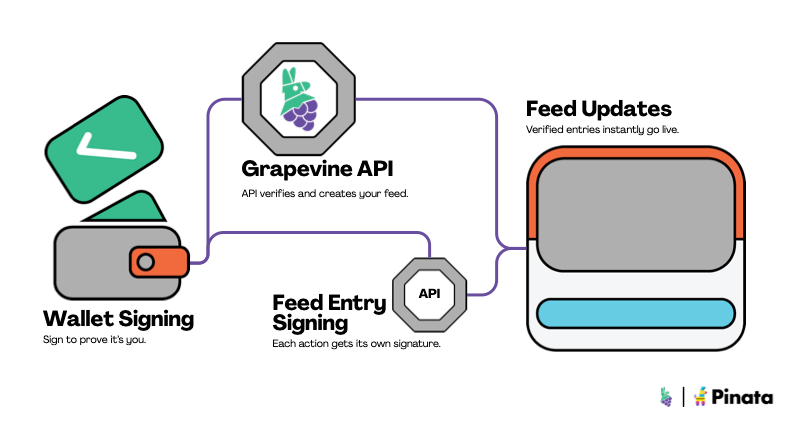
With the logic in place for data feed creation / updating, we needed a place to store the data in each data feed entry. When deciding on the storage layer, a key criteria was making sure that data in our feeds was tamper proof and verifiable.
Data storage layer
Traditional data feeds often use location-based approaches for the data they serve. In other words, an entry in a data feed would look something like: example.com/my-data-feed/1. The problem here is that this data could change at any time. One minute, this location could serve normal legitimate data, and the next, either through malice or accident, the file could be updated to serve something completely different. For systems making critical decisions based on the data coming through the feeds they rely on, this presents serious risks.
Pinata built our platform on the content addressable storage protocol known as IPFS. IPFS is the gold standard for how you work with offchain data in crypto-native systems because it allows you to work with data in a way that is tamper proof. When storing data on IPFS, content is run through a hashing algorithm that produces a Content Identifier (CID). When other systems want to retrieve that data, they ask for it by that CID and can verify the content they've received is the exact data they were expecting by checking the content against its CID during retrieval.
The traditional IPFS network is a public network, where everything can be accessed by anybody. However for a data feed, we want to restrict that content only to those who have permission to view it. This is where Private IPFS comes into play. Pinata's private IPFS offering combines the immutable nature of IPFS with privacy needed for data access control. Developers uploading to private IPFS receive back the same CID they would from uploading to public IPFS, but access is restricted behind presigned URLs or x402 payments (spoiler alert).
With the immutable properties of CIDs and the privacy of private IPFS, we had a powerful combination. Users upload a piece of data to Grapevine. They retrieve a CID for this private content. Grapevine then makes the CID publicly available on the data feed, while keeping the underlying data hidden and permissioned.
Data Serving Layer
Now that we had an immutable place to store the data feed entries, and a system for timestamping the CIDs for those entries, we needed a way to serve that data.All Pinata accounts come with dedicated gateways which can be used to serve both public and private IPFS files. This gateway provided us with an easy to use / drop-in data serving layer with the following built in functionality:
- Global CDN
- Analytics
- Content access controls
- X402 monetization for private content
Private files, which we're using for Grapevine, can be served either through a presigned url or an x402 payment. Grapevine leverages both of these mechanisms:
- Free data feed entries utilize presigned URLs. If somebody requests a file for a free entry, the server recognizes that entry is free and provisions a presigned url for the requester to consume
- Paid data feed entries utilize the built in x402 monetization functionality to provide x402 responses for paid content and then serve that content when a payment has been made
So how does the payment layer work? For each Grapevine entry, a price needs to be provided or the entry must be marked free. For paid entries, that price is sent to Pinata's API behind the scenes, which creates a Payment Instruction for that CID. When a user attempts to view that content via the Grapevine gateway like so:
gateway.grapevine.fyi/x402/cid/{CID}
They will receive back an x402 message that looks something like this:
{
  "x402Version": 1,
  "accepts": [
    {
      "scheme": "exact",
      "network": "base",
      "maxAmountRequired": "10000",
      "resource": "https://gateway.grapevine.fyi/x402/cid/bafkreih...",
      "description": "Access fee",
      "mimeType": "application/json",
      "payTo": "0x6135561038E7C676473431842e586C8248276AED",
      "maxTimeoutSeconds": 60,
      "asset": "0x833589fCD6eDb6E08f4c7C32D4f71b54bdA02913",
      "extra": {
        "name": "USD Coin",
        "version": "2"
      }
    }
  ],
  "error": "Provide a valid X-Payment header to access this content"
}
This signifies to the consumer that this content needs to be paid for in order to be accessed. Once that payment has been made, the gateway automatically serves the file to the user.
Luckily for Grapevine users, easy documentation exists for how to access x402 locked content for both:
- Pinata: https://docs.pinata.cloud/files/x402-accessing-paid-content
- Grapevine specifically: https://docs.grapevine.fyi/guides/x402#payment-flow
Analytics Layer
Once x402 purchases have gone through, the Grapevine Pinata gateway automatically sends a logpush of the transaction details to the Grapevine API, where the transaction is logged in the Grapevine database. From here, we were able to create analytics systems on top of this data to serve via our API and our front-end application.
To replicate this functionality on your end, you'll need to set up logpush for your Pinata gateway, which will send gateway logs and x402 transactions to a destination of your choice.
The Front-End / SDK
Every good backend needs a front-end and Grapevine is no exception. When building the Grapevine front-end, dogfooding was once again really important. So our front-end application at grapevine.fyi and the Grapevine typescript SDK co-evolved together.
Everything our front-end wanted to do, we made sure the SDK supported it. Because of this, our front-end acts as a first-class example of how you can work with Grapevine in the easiest way possible. We encourage you to take a look at the code and see for yourself.
Looking forward - making Grapevine crypto-native
As mentioned earlier in this post, our goals were initially to have Grapevine feeds exist natively on-chain. This provides some really powerful functionality in that:
- No server is needed to run a data feed platform, all logic lives on-chain and then at the x402 gateway layer
- Feed entry CIDs are timestamped natively with blockchain native ledger properties. This removes reliance on a database
- New feed entries are immediately blasted globally via on-chain events. Consumers can watch for real-time on-chain events instead of needing to poll an API to get updates.
We encourage anybody following this guide to explore this concept themselves and create data feeds on your favorite blockchain!
If you do, please let us know. We'd love to chat and see how we can help!